Make a photo black and white
Turn a colour photo or screenshot into shades of grey with the Mono or the Noir filter.
How to make a photo black and white#
- Paste a photo with Ctrl+V, drop a file on the page or press Load.
- The photo opens in black and white, with Mono applied. The undo button or Ctrl+Z brings its colours back, and History removes the filter later.
- For Noir, tap it before you open the photo. Once the photo is open, undo, then press Filter, tap Noir and press Apply.
- Copy with Ctrl+C, or save it as JPEG, PNG or WebP.
A photo that was already open when you came to this page, or one you reopen from History, opens as it was saved. To make it black and white, press Filter, tap Mono and press Apply.
Mono or Noir?#
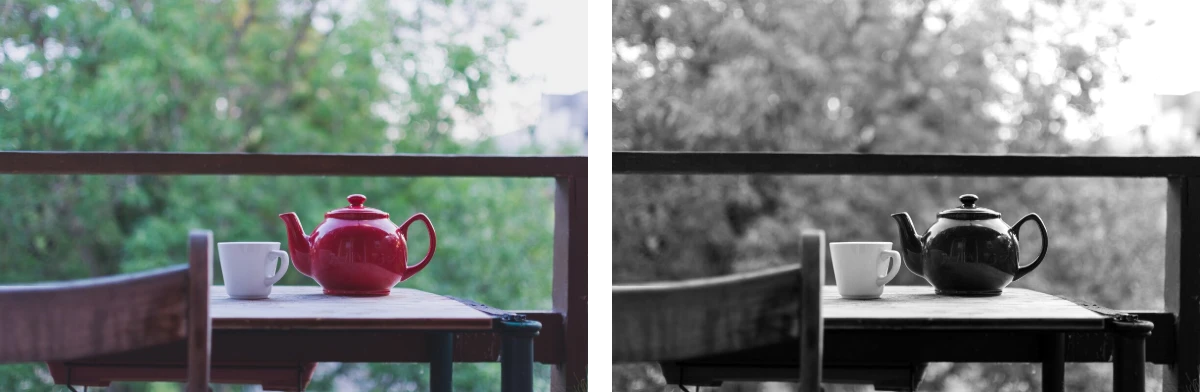
Mono turns each colour into a grey by how bright it looks, and adds a little contrast, so a bright yellow comes out white and a deep blue black. Noir counts red, green and blue alike, so reds and blues come out lighter than with Mono and greens and yellows darker. It adds more contrast than Mono. A dark grey comes out nearly black and a light grey nearly white. A red rose stands out from green leaves with Mono and blends into them with Noir. Both keep the shades of grey, and neither turns the photo into pure black and white, as for a stencil.
Sepia, further along the bar, gives a brown tone instead. You can also apply a filter to a photo on top of Mono, such as Fade for softer greys.
Keep some of the colour#
Strength sets how much of the filter shows, from 10% to 100%. Drag it sideways with a mouse, or tap it for a slider. At 100% the photo is black and white, and the lower you set it, the more of its colour comes back. To change Strength once the photo is open, undo, then press Filter, tap Mono or Noir, set Strength and press Apply. Every colour fades alike, so there's no way to keep one colour while the rest turns grey.
Why is there no Filter button?#
Filters need WebGL. Where the browser has it turned off, there's no Filter button, and a note says why.